- Nov 22 Fri 2024 14:14
-
Docker 指令介紹
- Jun 05 Wed 2024 14:42
-
Docker Container Backup/Restore
- Dec 20 Wed 2023 11:40
-
Android 在命令行日志输出中查看Firebase Analytics事件
引用網址:https://itmob.cn/archives/zai-ming-ling-xing-ri-zhi-shu-chu-zhong-cha-kan-firebase-analytics-shi-jian
可以在 Android Studio 调试日志中或命令行启用和查看详细的Analytics日志记录,从而帮助验证 SDK 是否已正确记录事件。其中包括自动和手动记录的事件。
- Aug 10 Thu 2023 09:55
-
Elasticsearch常用配置及性能参数
- May 09 Tue 2023 14:24
-
Android SDK命令行工具apksigner
引用網址:https://blog.csdn.net/w00347190/article/details/106227682
您可以使用 Android SDK 构建工具的修订版 24.0.3 及更高版本中提供的 apksigner 工具为 APK 签名,并确保 APK 的签名能够在 APK 支持的所有版本的 Android 平台上成功通过验证。本页提供了有关如何使用该工具的简短指南,并可作为查阅该工具支持的不同命令行选项的参考文档。如需有关如何使用 apksigner 工具为 APK 签名的更完整说明,请参阅为您的应用签名指南。
- May 03 Wed 2023 16:49
-
Google Drive File Upload Using The Terminal
引用網址:https://medium.com/@ianhutch90/google-drive-file-upload-using-the-terminal-3652ee90a6f6
- Feb 08 Wed 2023 11:18
-
Deploying an AES-128 Encrypted HTTP Live Stream (HLS)

引用:https://ggicci.me/deploying-an-aes-128-encrypted-http-live-stream-hls/
HTTP Live Streaming (HLS) is an HTTP-based adaptive bitrate streaming communications protocol developed by Apple Inc. and released in 2009.
- Jan 17 Tue 2023 23:26
-
Kafka 入門
- May 19 Thu 2022 16:31
-
Nginx的server_name和location配置
引用網址:https://segmentfault.com/a/1190000021771733
Nginx是目前最流行的Web服务器,由于具备高性能、高可靠以及支持热部署等特性被人们所青睐。Nginx用途广泛,其可作为静态资源服务器,也可充当代理服务器(HTTP/TCP/UDP/MAIL等),还可以用来实现一些简单的API服务。Nginx主要是通过其配置文件(一般名为nginx.conf)来控制它的行为,本文主要介绍其http模块下的 server_name和location这两条指令的配置。
- Apr 07 Thu 2022 11:37
-
securecrt密码获取
引用網址:https://www.cnblogs.com/Yang34/p/14237114.html
实际使用
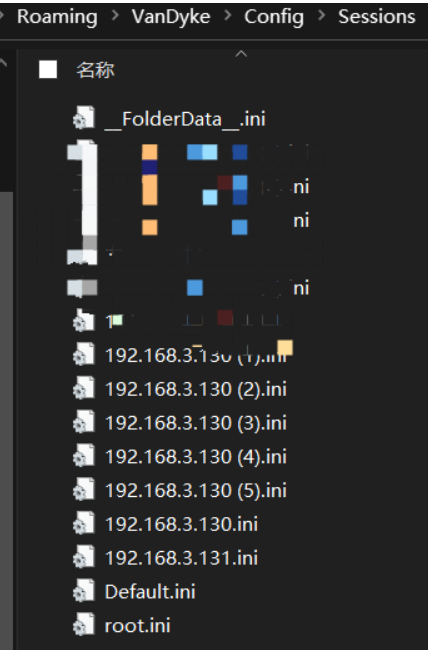
找到目标securecrt保存在本地的所有连接会话文件,默认都存放在当前用户数据目录下的Config目录下的Sessions目录中,以.ini命名
%APPDATA%\VanDyke\Config\Sessions
C:\Users\yang\AppData\Roaming\VanDyke\Config\Sessions
图形化也可以直接拿到路径
第一种
进入目录提取文件中的连接IP、端口、账号、hash
7.X:
findstr /si /c:"Hostname" /c:"\"Username\"=" /c:"\"Password\"=" /c:"\"[SSH2] Port\"=" *.ini
8.X:
findstr /si /c:"Hostname" /c:"\"Username\"=" /c:"\"Password V2\"=" /c:"\"[SSH2] Port\"=" *.ini
密码拿回本地进行解密即可
7.X,注意去除第一位 "u":
python3 SecureCRTCipher.py dec hash
8.X,注意去除前面三位 "02:":
python3 SecureCRTCipher.py dec -v2 hash
第二种
这个其实适合7.X以下的版本
python3 SecureCRT-decryptpass.py 127.0.0.1.ini
附带脚本
SecureCRTCipher.py
#!/usr/bin/env python3
import os
from Crypto.Hash import SHA256
from Crypto.Cipher import AES, Blowfish
class SecureCRTCrypto:
def __init__(self):
'''
Initialize SecureCRTCrypto object.
'''
self.IV = b' ' * Blowfish.block_size
self.Key1 = b'$=[~'
self.Key2 = b'_EA'
def Encrypt(self, Plaintext : str):
'''
Encrypt plaintext and return corresponding ciphertext.
Args:
Plaintext: A string that will be encrypted.
Returns:
Hexlified ciphertext string.
'''
plain_bytes = Plaintext.encode('utf-16-le')
plain_bytes += b' '
padded_plain_bytes = plain_bytes + os.urandom(Blowfish.block_size - len(plain_bytes) % Blowfish.block_size)
cipher1 = Blowfish.new(self.Key1, Blowfish.MODE_CBC, iv = self.IV)
cipher2 = Blowfish.new(self.Key2, Blowfish.MODE_CBC, iv = self.IV)
return cipher1.encrypt(os.urandom(4) + cipher2.encrypt(padded_plain_bytes) + os.urandom(4)).hex()
def Decrypt(self, Ciphertext : str):
'''
Decrypt ciphertext and return corresponding plaintext.
Args:
Ciphertext: A hex string that will be decrypted.
Returns:
Plaintext string.
'''
cipher1 = Blowfish.new(self.Key1, Blowfish.MODE_CBC, iv = self.IV)
cipher2 = Blowfish.new(self.Key2, Blowfish.MODE_CBC, iv = self.IV)
ciphered_bytes = bytes.fromhex(Ciphertext)
if len(ciphered_bytes) <= 8:
raise ValueError('Invalid Ciphertext.')
padded_plain_bytes = cipher2.decrypt(cipher1.decrypt(ciphered_bytes)[4:-4])
i = 0
for i in range(0, len(padded_plain_bytes), 2):
if padded_plain_bytes[i] == 0 and padded_plain_bytes[i + 1] == 0:
break
plain_bytes = padded_plain_bytes[0:i]
try:
return plain_bytes.decode('utf-16-le')
except UnicodeDecodeError:
raise(ValueError('Invalid Ciphertext.'))
class SecureCRTCryptoV2:
def __init__(self, ConfigPassphrase : str = ''):
'''
Initialize SecureCRTCryptoV2 object.
Args:
ConfigPassphrase: The config passphrase that SecureCRT uses. Leave it empty if config passphrase is not set.
'''
self.IV = b' ' * AES.block_size
self.Key = SHA256.new(ConfigPassphrase.encode('utf-8')).digest()
def Encrypt(self, Plaintext : str):
'''
Encrypt plaintext and return corresponding ciphertext.
Args:
Plaintext: A string that will be encrypted.
Returns:
Hexlified ciphertext string.
'''
plain_bytes = Plaintext.encode('utf-8')
if len(plain_bytes) > 0xffffffff:
raise OverflowError('Plaintext is too long.')
plain_bytes = \
len(plain_bytes).to_bytes(4, 'little') + \
plain_bytes + \
SHA256.new(plain_bytes).digest()
padded_plain_bytes = \
plain_bytes + \
os.urandom(AES.block_size - len(plain_bytes) % AES.block_size)
cipher = AES.new(self.Key, AES.MODE_CBC, iv = self.IV)
return cipher.encrypt(padded_plain_bytes).hex()
def Decrypt(self, Ciphertext : str):
'''
Decrypt ciphertext and return corresponding plaintext.
Args:
Ciphertext: A hex string that will be decrypted.
Returns:
Plaintext string.
'''
cipher = AES.new(self.Key, AES.MODE_CBC, iv = self.IV)
padded_plain_bytes = cipher.decrypt(bytes.fromhex(Ciphertext))
plain_bytes_length = int.from_bytes(padded_plain_bytes[0:4], 'little')
plain_bytes = padded_plain_bytes[4:4 + plain_bytes_length]
if len(plain_bytes) != plain_bytes_length:
raise ValueError('Invalid Ciphertext.')
plain_bytes_digest = padded_plain_bytes[4 + plain_bytes_length:4 + plain_bytes_length + SHA256.digest_size]
if len(plain_bytes_digest) != SHA256.digest_size:
raise ValueError('Invalid Ciphertext.')
if SHA256.new(plain_bytes).digest() != plain_bytes_digest:
raise ValueError('Invalid Ciphertext.')
return plain_bytes.decode('utf-8')
if __name__ == '__main__':
import sys
def Help():
print('Usage:')
print(' SecureCRTCipher.py <enc|dec> [-v2] [-p ConfigPassphrase] <plaintext|ciphertext>')
print('')
print(' <enc|dec> "enc" for encryption, "dec" for decryption.')
print(' This parameter must be specified.')
print('')
print(' [-v2] Encrypt/Decrypt with "Password V2" algorithm.')
print(' This parameter is optional.')
print('')
print(' [-p ConfigPassphrase] The config passphrase that SecureCRT uses.')
print(' This parameter is optional.')
print('')
print(' <plaintext|ciphertext> Plaintext string or ciphertext string.')
print(' NOTICE: Ciphertext string must be a hex string.')
print(' This parameter must be specified.')
print('')
def EncryptionRoutine(UseV2 : bool, ConfigPassphrase : str, Plaintext : str):
try:
if UseV2:
print(SecureCRTCryptoV2(ConfigPassphrase).Encrypt(Plaintext))
else:
print(SecureCRTCrypto().Encrypt(Plaintext))
return True
except:
print('Error: Failed to encrypt.')
return False
def DecryptionRoutine(UseV2 : bool, ConfigPassphrase : str, Ciphertext : str):
try:
if UseV2:
print(SecureCRTCryptoV2(ConfigPassphrase).Decrypt(Ciphertext))
else:
print(SecureCRTCrypto().Decrypt(Ciphertext))
return True
except:
print('Error: Failed to decrypt.')
return False
def Main(argc : int, argv : list):
if 3 <= argc and argc <= 6:
bUseV2 = False
ConfigPassphrase = ''
if argv[1].lower() == 'enc':
bEncrypt = True
elif argv[1].lower() == 'dec':
bEncrypt = False
else:
Help()
return -1
i = 2
while i < argc - 1:
if argv[i].lower() == '-v2':
bUseV2 = True
i += 1
elif argv[i].lower() == '-p' and i + 1 < argc - 1:
ConfigPassphrase = argv[i + 1]
i += 2
else:
Help()
return -1
if bUseV2 == False and len(ConfigPassphrase) != 0:
print('Error: ConfigPassphrase is not supported if "-v2" is not specified')
return -1
if bEncrypt:
return 0 if EncryptionRoutine(bUseV2, ConfigPassphrase, argv[-1]) else -1
else:
return 0 if DecryptionRoutine(bUseV2, ConfigPassphrase, argv[-1]) else -1
else:
Help()
exit(Main(len(sys.argv), sys.argv))
SecureCRT-decryptpass.py
#!/usr/bin/env python
#
# Decrypt SSHv2 passwords stored in VanDyke SecureCRT session files
# Can be found on Windows in:
# %APPDATA%\VanDyke\Config\Sessions\sessionname.ini
# Tested with version 7.2.6 (build 606) for Windows
# Eloi Vanderbeken - Synacktiv
# Decrypt SSHv2 passwords stored in VanDyke SecureCRT
# C:\>python SecureCRT-decryptpass.py -h
# usage: SecureCRT-decryptpass.py [-h] files [files ...]
#
#Tool to decrypt SSHv2 passwords in VanDyke Secure CRT session files
#
#positional arguments:
# files session file(s)
#
#optional arguments:
# -h, --help show this help message and exit
#
# C:\>python SecureCRT-decryptpass.py C:\Users\user1\AppData\Roaming\VanDyke\Config\Sessions\192.168.0.1.ini
# C:\Users\user1\AppData\Roaming\VanDyke\Config\Sessions\192.168.0.1.ini
# ssh -p 22 user@192.168.0.1 # 123456
from Crypto.Cipher import Blowfish
import argparse
import re
def decrypt(password) :
c1 = Blowfish.new('5F B0 45 A2 94 17 D9 16 C6 C6 A2 FF 06 41 82 B7'.replace(' ','').decode('hex'), Blowfish.MODE_CBC, ' '*8)
c2 = Blowfish.new('24 A6 3D DE 5B D3 B3 82 9C 7E 06 F4 08 16 AA 07'.replace(' ','').decode('hex'), Blowfish.MODE_CBC, ' '*8)
padded = c1.decrypt(c2.decrypt(password.decode('hex'))[4:-4])
p = ''
while padded[:2] != ' ' :
p += padded[:2]
padded = padded[2:]
return p.decode('UTF-16')
REGEX_HOSTNAME = re.compile(ur'S:"Hostname"=([^\r\n]*)')
REGEX_PASWORD = re.compile(ur'S:"Password"=u([0-9a-f]+)')
REGEX_PORT = re.compile(ur'D:"\[SSH2\] Port"=([0-9a-f]{8})')
REGEX_USERNAME = re.compile(ur'S:"Username"=([^\r\n]*)')
def hostname(x) :
m = REGEX_HOSTNAME.search(x)
if m :
return m.group(1)
return '???'
def password(x) :
m = REGEX_PASWORD.search(x)
if m :
return decrypt(m.group(1))
return '???'
def port(x) :
m = REGEX_PORT.search(x)
if m :
return '-p %d '%(int(m.group(1), 16))
return ''
def username(x) :
m = REGEX_USERNAME.search(x)
if m :
return m.group(1) + '@'
return ''
parser = argparse.ArgumentParser(description='Tool to decrypt SSHv2 passwords in VanDyke Secure CRT session files')
parser.add_argument('files', type=argparse.FileType('r'), nargs='+',
help='session file(s)')
args = parser.parse_args()
for f in args.files :
c = f.read().replace(' ', '')
print f.name
print "ssh %s%s%s # %s"%(port(c), username(c), hostname(c), password(c))
- Jan 20 Thu 2022 17:53
-
Linux下apache以root身份运行
引用網址:https://zohead.com/archives/linux-apache-root/
最近在某个项目需求中需要在 Linux 下使 apache 以 root 身份运行(默认使用的是 apache 用户),直接修改 apache 配置文件 httpd.conf 中的运行身份为 User root 和 Group root 后启动 apache 结果会报下面的错误:
- Jan 20 Thu 2022 17:51
-
修改apache的httpd服务为root权限
引用網址:https://blog.csdn.net/wentinghe/article/details/41449433
一、修改配置文件
修改配置文件及重启服务
[root@localhost ~]# cd /etc/httpd/conf
[root@localhost conf]# vim httpd.conf修改配置文件
将User 和group改为root:
[root@localhost conf]# service httpd restart
Stopping httpd: [ OK ]
Starting httpd: Syntax error on line 244 of/etc/httpd/conf/httpd.conf:
Error:\tApache has not been designed to serve pageswhile\n\trunning as root. There areknown race conditions that\n\twill allow any local user to read any file on thesystem.\n\tIf you still desire to serve pages as root then\n\tadd -DBIG_SECURITY_HOLEto the CFLAGS env variable\n\tand then rebuild the server.\n\tIt is stronglysuggested that you instead modify the User\n\tdirective in your httpd.conf fileto list a non-root\n\tuser.\n
<span style="color:#ff6666;">[FAILED]</span>
[root@localhost conf]#
一、修改配置文件
修改配置文件及重启服务
[root@localhost ~]# cd /etc/httpd/conf
[root@localhost conf]# vim httpd.conf修改配置文件
将User 和group改为root:
[root@localhost conf]# service httpd restart
Stopping httpd: [ OK ]
Starting httpd: Syntax error on line 244 of/etc/httpd/conf/httpd.conf:
Error:\tApache has not been designed to serve pageswhile\n\trunning as root. There areknown race conditions that\n\twill allow any local user to read any file on thesystem.\n\tIf you still desire to serve pages as root then\n\tadd -DBIG_SECURITY_HOLEto the CFLAGS env variable\n\tand then rebuild the server.\n\tIt is stronglysuggested that you instead modify the User\n\tdirective in your httpd.conf fileto list a non-root\n\tuser.\n
<span style="color:#ff6666;">[FAILED]</span>
[root@localhost conf]#